
Addabill

SystemsJuly 2026

The sticky note, the spreadsheet and the reminder app: what each one catches, and what slips past

Four ways to keep bills straight, laid side by side, with the failure of each one named plainly. Ours included.

A five minute readAll four pieces

Several yellow and pink sticky notes on a white fridge door with their corners curling, photographed up close.

Every bill keeper has a system, and every system is a good answer to part of the question. That's why they're so hard to give up. The sticky note isn't silly. The spreadsheet isn't overkill. The reminder app isn't lazy. Each one catches something real, each one lets something else through, and the something is usually the bill that went late. Here's what each one actually does, including the one we make.

The sticky note: visible right up until it isn't

A note on the fridge is the most honest system there is. You see it every time you get the milk. It costs nothing and it needs no login. For one or two bills with hard dates, it's close to perfect.

What it catches: the bill you'd otherwise forget exists. A note that says CAR INS does its job by being in your eyeline.

What slips past: everything about the bill except its name. CAR INS, but not how much, not which day, not where to pay it, and not whose turn it is. The note also has a lifespan. It curls at the corners in about a month, the adhesive gives up, and it ends up face down under the fridge with the magnets that fell. And it can't leave the kitchen. If you're at work when the due date arrives, the note is still at home, doing nothing.

The spreadsheet: brilliant with totals, useless on a Tuesday

A spreadsheet knows everything the sticky note doesn't. Every biller in a column, every amount, a total at the bottom that tells you what the house costs to run. If you've ever built one, you know the quiet satisfaction of the sum.

What it catches: the whole picture. Which bills went up this year. What a month really costs. Where the money goes.

What slips past: time. A spreadsheet doesn't know what day it is. It sits in a folder until you open it, and nobody opens a spreadsheet on a random Tuesday to see what's due Thursday. It's also work to keep true. The column you filled in faithfully through February goes blank in March, and from then on the totals are fiction. A spreadsheet is a fine record and a poor alarm.

The reminder app: knows the time, not the bill

Phone reminders fix the spreadsheet's problem. They know what day it is and they interrupt you. A reminder that says "Pay electric" at 9 a.m. on the 14th will fire whether you remember or not.

What it catches: the date. If the only thing between you and on time is being told, a reminder app tells you.

What slips past: the bill. "Pay electric" sits between "buy milk" and "call Mom" and looks exactly like them, so it gets swiped like them. It doesn't carry the amount, so you can't tell whether this month is normal. It doesn't carry the link, so you go hunting for the login. It doesn't know that your partner handles the electric now. And when you've paid, nothing happens; the reminder just stops, and there's no record that it was paid or what it cost.
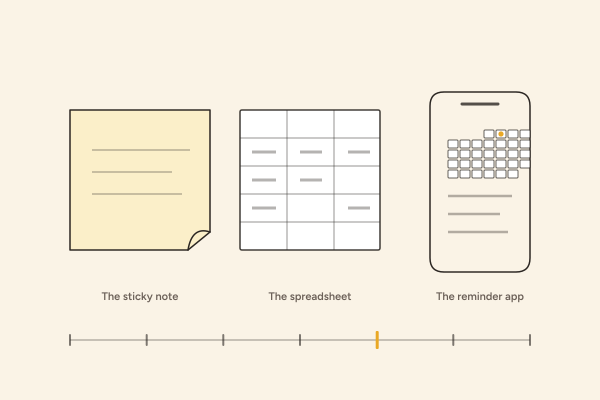
A curling sticky note, a spreadsheet grid and a phone showing a small month with one marigold dot, drawn in graphite line.

From the kit

Three systems, drawn in graphite line

A curling sticky note, a spreadsheet grid and a phone with a small month on it. Each one catches something real. Each one lets something else through.

What Addabill catches, and what it doesn't

Addabill was built to know the bill. Each one goes in with its biller, its amount and its due day, by typing or by photographing the paper, and stands on one month with every other bill the house has. Before it's due, a text arrives with the biller, the amount, the date and a link to that biller's own payment page. On the Household plan the calendar is shared, so the text about the electric reaches the person who handles the electric, at their number. Mark it paid and it stays paid, with 12 months of history behind it on Household. That's the sticky note's visibility, the spreadsheet's record and the reminder app's timing in one place, and it travels to wherever your phone is.

Now the part most comparison pages leave out.

Addabill doesn't pay anything for you. Ever. The text arrives, you tap the link, you pay on the biller's page the way you did before. If you read the text and set the phone down, the bill is exactly as unpaid as it was. We think that's the right design, since a calendar has no place near your money, but it means the last step is always yours.

It only knows what you add. A bill you never typed or photographed isn't late in Addabill; it's invisible, same as it would be on a sticky note you never wrote. The first evening of adding everything is real work, and nothing we do removes it.

And the Free plan holds five bills at a time. That's enough for the five that cause the trouble, and it's honest about being a limit. The house with fourteen billers needs the Household plan, at $5 a month, or it needs to choose which five matter.

SystemWhat it catchesWhat slips past
The sticky notethe bill you'd otherwise forget existseverything about the bill except its name
The spreadsheetthe whole picturetime
The reminder appthe datethe bill
Addabillthe sticky note's visibility, the spreadsheet's record and the reminder app's timing in one placeAddabill doesn't pay anything for you. It only knows what you add.

Pick by what slips through in your house

If your bills go late because you forget they exist, the spreadsheet won't save you; you need the alarm, and any alarm helps. If they go late because you were at work when the date came, the alarm needs to be on your phone and carry the link. If they go late because the person who was supposed to pay didn't know it was their turn, the calendar needs to be shared. And if you want to know what the year cost, you need a record that fills itself in as you mark things paid.

None of these is a character flaw. They're different holes, and the right system is the one shaped like yours.

Before you go

If you'd like to see how your own bills sit on a month before choosing anything, Build your month takes three of them and shows you.

Three of your own bills on a month, and the texts you would get. Nothing is stored.

Build your month

More from the blog

All four pieces

A pile of envelopes on a wooden counter with one window envelope on top, lit by hard light from the side.

Autopay

Autopay is not a plan

Set it and forget it works right up until the morning the draft runs before the paycheck posts. There's a calmer arrangement: hear about the bill, then pay it on a day you picked.

Read: Autopay is not a plan